SenseTime pushed the final weights for SenseNova-U1.5-8B-MoT to Hugging Face on August 19, and the interesting part is not the benchmark chart. It is the license. The whole thing — generation, editing, and image understanding in one checkpoint — ships under Apache 2.0. No research-only clause, no territorial restriction, no revenue cap.
That matters because most image models worth using in 2026 come with a catch, and the ones that don’t tend to only generate — you still need a second model to edit. SenseNova-U1.5 does both from the same weights, and there’s a browser demo you can hit right now with no account. Here’s what it costs to run, and where it falls down.
At a Glance
- What it is: A natively unified multimodal model from SenseTime that generates images from text, edits images from instructions, and answers questions about images — all in one 8-shard checkpoint.
- What’s free: Everything. Apache 2.0 weights, Apache 2.0 inference code, an official 8-step speed LoRA, and a no-login browser demo on Hugging Face.
- What it costs: $0 in licensing. The real cost is disk and VRAM — the full bf16 checkpoint is ~35 GB across eight safetensors shards.
- The low-VRAM path: Community GGUF quants run from 9.26 GB (Q2_K) to 21.17 GB (Q8_0) in ComfyUI, plus an FP8 build at 17.6 GB.
- The one catch: “8B” is the language backbone, not the download. The Mixture-of-Transformers design stores separate towers, so budget for a 35 GB pull even though the name says 8B.
One model, three jobs
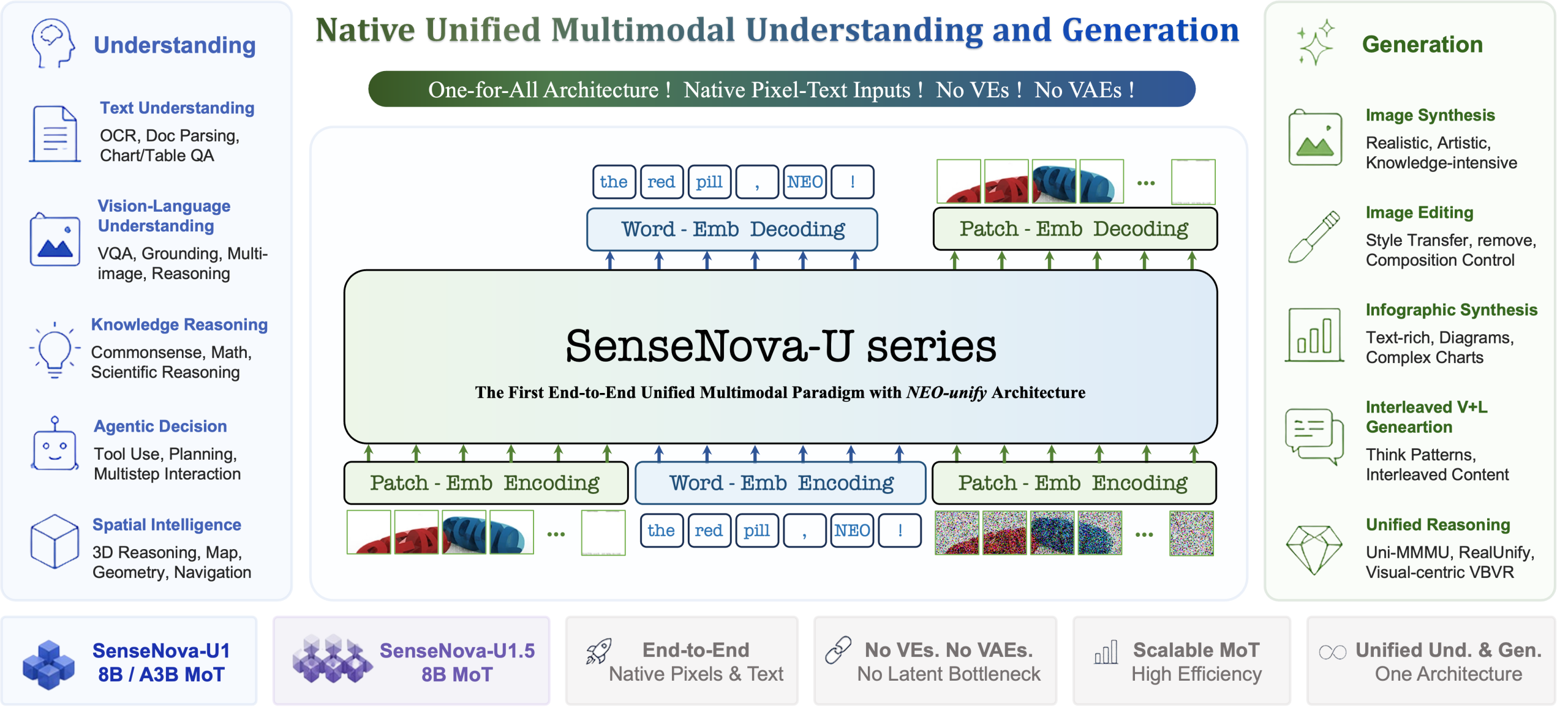
Most open image stacks are a pipeline of specialists: a text encoder, a diffusion transformer, a separate inpainting model to change a jacket colour, a VLM bolted on for captions. SenseNova-U1.5 collapses that into one set of weights using an architecture SenseTime calls NEO-unify, described in the paper SenseNova-U1: Unifying Multimodal Understanding and Generation.
The config file shows what’s inside: a Qwen3 backbone with 42 layers and a 4096 hidden size — that’s where the “8B” comes from — wrapped in a MoT (Mixture of Transformers) structure that keeps modality-specific weights separate. The upshot is that the model reads your edit instruction with a real language model rather than a CLIP encoder, which is why it handles constraints like “preserve the face, pose, background, lighting, and framing” instead of quietly redrawing the frame.
What actually changed from the Preview
A Preview build landed on July 28. The August 19 release is the RL-tuned final. Three of the six listed improvements matter to a working creator:
- Text rendering and infographics. Legible English and Chinese text with clearer hierarchy in posters and text-dense layouts. This is the weakest area of most open models, so stress-test it first.
- Native 4K. Not upscaled — the reference script takes
--width 2048 --height 2048directly. - Region-level control. Bounding boxes, visual markers, and single- or multi-image references for pointing the model at a specific area.
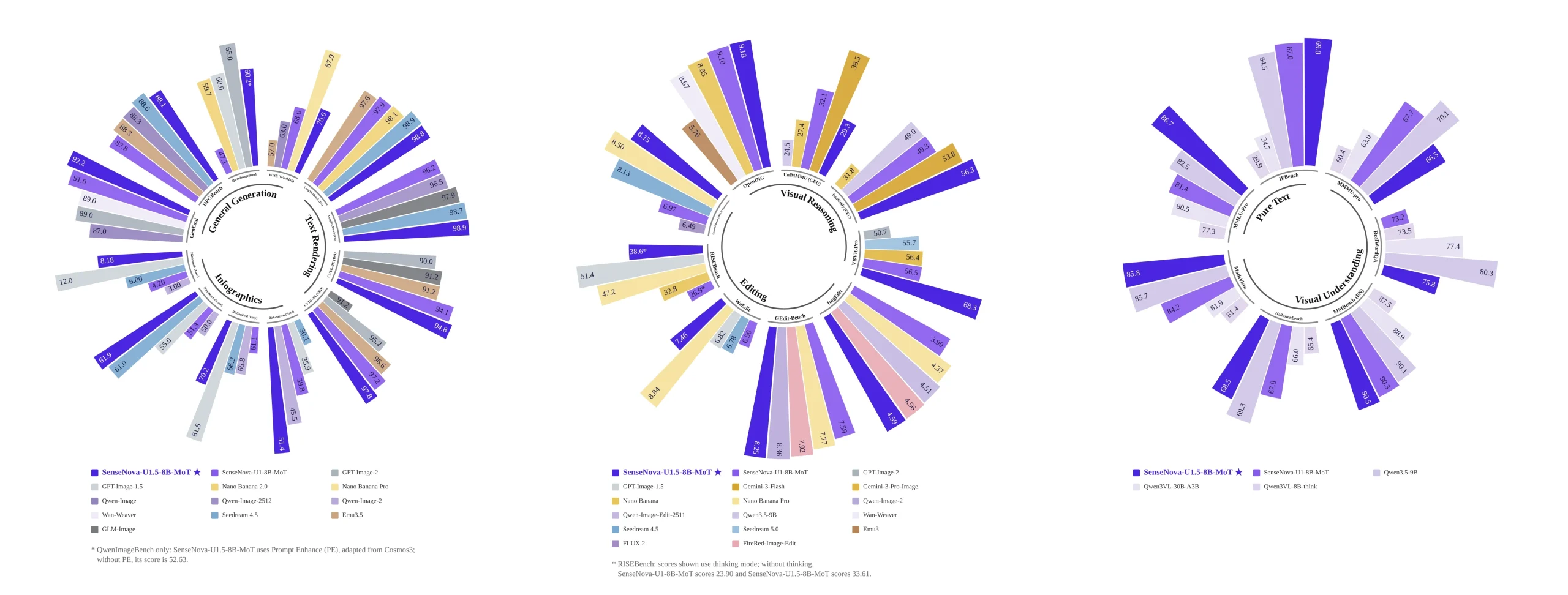
One caveat on the numbers: the benchmark charts on the model card are lab-reported by SenseTime. At the time of writing no independent third-party evaluation of the 8B-MoT release has appeared on a public leaderboard. Treat the radial chart as a claim, not a measurement.
How it compares to the other free options
The permissive open-weights image field is smaller than it looks. Here’s where U1.5 sits:
| Model | License | Generates | Edits | No-login demo |
|---|---|---|---|---|
| SenseNova-U1.5-8B-MoT | Apache 2.0 | Yes, native 4K | Yes, same weights | Yes (HF Space) |
| Z-Image-Turbo | Apache 2.0 | Yes, fast | No | Yes |
| FLUX.1-schnell | Apache 2.0 | Yes | No (needs Kontext) | Yes |
| Krea 2 Turbo | Custom (“other”) | Yes | No | Yes |
If your workflow is “generate a hero image and move on,” Z-Image-Turbo is lighter and quicker. If it’s “generate, then revise fifteen times without losing the subject,” U1.5 saves you an entire model load. Same argument we made when Grok Imagine Image 2.0 topped the leaderboard behind a paywall — the free model that fits your loop beats the ranked model you can’t run.
Try It Free
Zero install, zero account — start here. The SenseNova-U1.5-8B-MoT Hugging Face Space runs on ZeroGPU and does both jobs from one form. Leave the upload box empty and type a prompt for text-to-image; drop an image in and write an instruction for editing. The aspect ratio selector sits under the prompt box, and the seed comes back with the output so you can reproduce a result.
The official playground, with a caveat. SenseTime’s SenseNova Studio is free and has a nicer interface plus an inspiration gallery, but “Enter intelligent generation workspace” bounces you to a sign-in wall — SMS, GitHub, or Google. Worth it for daily use; skip it to test three prompts.
Running it locally. The reference implementation lives on the OpenSenseNova/SenseNova-U1 GitHub repo (5.6k stars, Apache 2.0). Upstream environment is Python 3.11, PyTorch 2.8, CUDA 12.8. Setup is three lines:
git clone https://github.com/OpenSenseNova/SenseNova-U1.git
cd SenseNova-U1
uv sync && source .venv/bin/activate
Then text-to-image:
python examples/t2i/inference.py \
  --model_path sensenova/SenseNova-U1.5-8B-MoT \
  --prompt "A cinematic mountain lake at sunrise, realistic photography." \
  --width 2048 --height 2048 \
  --device_map auto \
  --output output.png
And editing, which is the same script family with an --image flag:
python examples/editing/inference.py \
  --model_path sensenova/SenseNova-U1.5-8B-MoT \
  --image input.png \
  --prompt "Change the jacket to cobalt blue. Preserve the face, pose, background, lighting, and framing." \
  --output edited.png
If you don’t have 35 GB of VRAM. Most people don’t. The repo ships a --vram_mode flag with four settings: full (everything on GPU, fastest), fast and balanced (async prefetch overlapping host-to-device transfer with compute), and low (synchronous per-layer CPU↔GPU swap, smallest footprint, slowest). It’s mutually exclusive with --device_map, since layer offload needs the model on CPU between forward passes. The examples README recommends a per-GPU budget below physical VRAM — 26–28 GiB on a 32 GB card — because activations and generation intermediates need headroom the weight budget ignores.
The ComfyUI route. Community GGUF quantizations run from Q2_K at 9.26 GB to Q8_0 at 21.17 GB, with sensitive layers kept at F16. They need a specific node fork — ComfyUI_SenseNova_U1_REBEL — or you get shape mismatches. Drop the .gguf into ComfyUI/models/gguf/, load with SenseNova_SM_Model, feed SenseNova_SM_Sampler. There’s also an FP8 pruned build at 17.6 GB to stay in safetensors.
The honest trade-offs
Credit where it’s due: SenseTime publishes its own failure list on the model card. Five known problems, straight from the source:
- Oversaturation and detail noise. Some prompts produce excessive high-frequency detail or blown-out colour. The fix is lowering
cfg_scale. - Dense text still breaks. Despite the text-rendering improvements, small, lengthy or mixed Chinese-English text produces errors.
- Tight layouts drift. Exact object counts, alignment and hierarchy can be imperfect when you stack constraints.
- Hands and small faces. The usual — fine-grained human structure remains unstable.
- Multi-turn editing drifts. Broad, multi-turn or multi-reference edits wander, especially when many regions must be preserved at once.
Two more that aren’t on the card: the 35 GB download is the real barrier, and the GGUF path costs you quality plus a third-party node fork with a handful of stars. And because this is a new architecture, LoRA and ControlNet ecosystems don’t exist for it yet. If your work depends on a library of custom LoRAs, you’re not migrating this week.
Five things to do differently
- Say what to preserve, not just what to change. The official example is explicit — “Preserve the face, pose, background, lighting, and framing.” The language backbone acts on that. Vague edit prompts get vague edits.
- Grab the 8-step LoRA before you complain about speed. SenseTime shipped an official 0.4B distilled adapter that cuts text-to-image to 8 denoising steps, plus a ComfyUI-packaged version at 810 MB in the FP8 repo.
- Drop cfg_scale first when output looks fried. Don’t rewrite the prompt — the card names this as the fix for oversaturation.
- Generate 4K natively, don’t upscale. Pass the resolution flags rather than running a separate upscale pass.
- Read the cookbook before the first run. The U1.5 best practices doc covers prompt enhancement, Image PE and Caption-to-Prompt recipes that materially change output quality.
Building a fully free local stack? This pairs with the lighter specialists we’ve covered — Anima-2.9B for stylised work in a 3 GB build when 35 GB is too much, and SAM 3D Body in ComfyUI if your output feeds a 3D pipeline. We also put seven image generators head-to-head on identical prompts in Which AI Image Generator is Actually Best? on the Creative AI Show channel — a useful baseline before committing an afternoon to a 35 GB download.
Frequently asked questions
Is SenseNova-U1.5 free?
Yes, completely. The weights, the inference code, and the official 8-step LoRA are all released under Apache 2.0. You can try it in a browser with no account via the Hugging Face Space, or download and run it locally at no cost.
Can I use SenseNova-U1.5 commercially?
Yes. Apache 2.0 permits commercial use, modification and redistribution, with no revenue cap and no territorial restriction — a meaningful difference from models under custom or research-only licences. Check the terms of any hosted API separately; the model licence doesn’t carry over to third-party services.
What are SenseNova-U1.5’s system requirements?
The full bf16 checkpoint is roughly 35 GB across eight safetensors shards, so a 48 GB card runs it comfortably in full mode. On smaller GPUs use --vram_mode balanced or low to offload layers, or switch to a GGUF quant in ComfyUI — Q2_K is 9.26 GB and targets 8 GB cards. Software: Python 3.11, PyTorch 2.8, CUDA 12.8.
Can SenseNova-U1.5 edit existing images?
Yes — that’s the main reason to choose it. Local edits, text edits, insertion, replacement and multi-reference edits all run from the same checkpoint as generation, using examples/editing/inference.py with an --image flag. No separate inpainting model required.
Why is an “8B” model 35 GB?
Because “8B” describes the Qwen3 language backbone, not the total checkpoint. The MoT (Mixture of Transformers) design keeps modality-specific weight towers separate, so the stored parameter count is well above 8B even though the active language path matches an 8B model. Budget for the download size, not the name.
Accurate as of August 26, 2026 — model weights, quantizations and leaderboard positions move fast. Benchmark figures referenced above are published by SenseTime and have not been independently verified at the time of writing.
No responses yet